Cat & Company — A Two-Session Scratch Unit
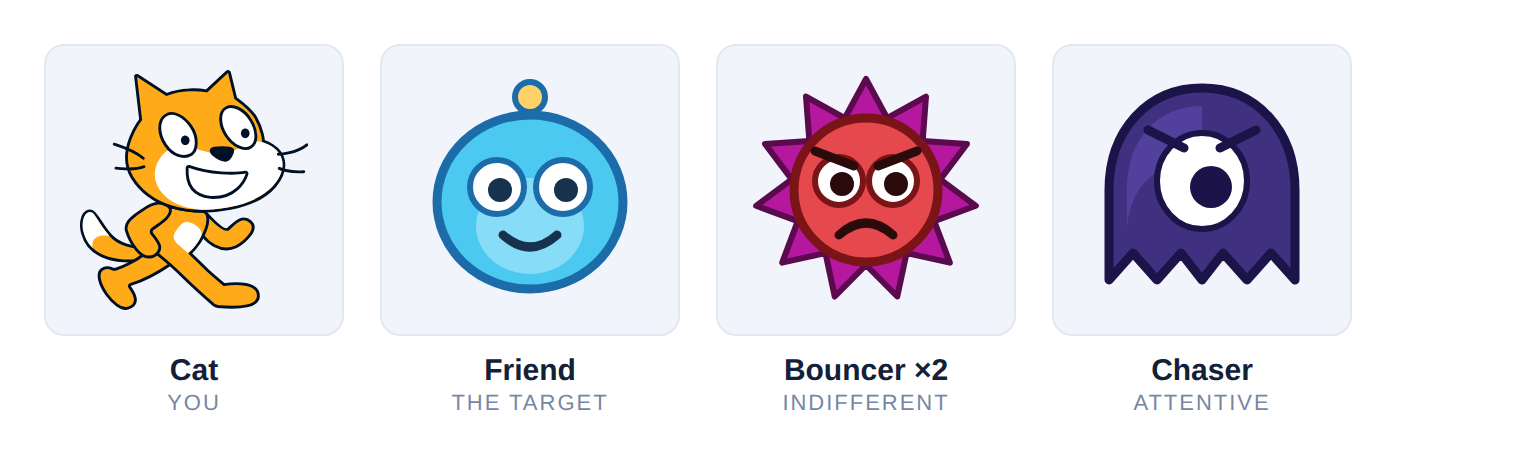
A complete unit for eleven- to thirteen-year-olds who have never opened Scratch. Two thirty-minute sessions. By the end they have a real game: a cat you drive, a friend that runs away from you, three enemies with two different personalities, lives, a score, an ending, and a difficulty curve that reacts to how well they are doing.
Every mechanic exists because it teaches one specific block idea. Nothing is decoration.
The Game
Drive the Scratch Cat with the arrow keys. Catch the Friend, which glides to a random spot, rests a second, and darts off again — touch it and it pops out of sight for half a second before turning up somewhere else. Ten points wins.
Two Bouncers ricochet around the stage, indifferent to where you are. The Chaser is not indifferent: it walks straight at the cat, forever, at about 40% of your speed. Any hit costs one of three lives and sends the cat home.
And the cat starts small and grows — 20% at the first point, 140% by the tenth — while the bouncers speed up alongside it.
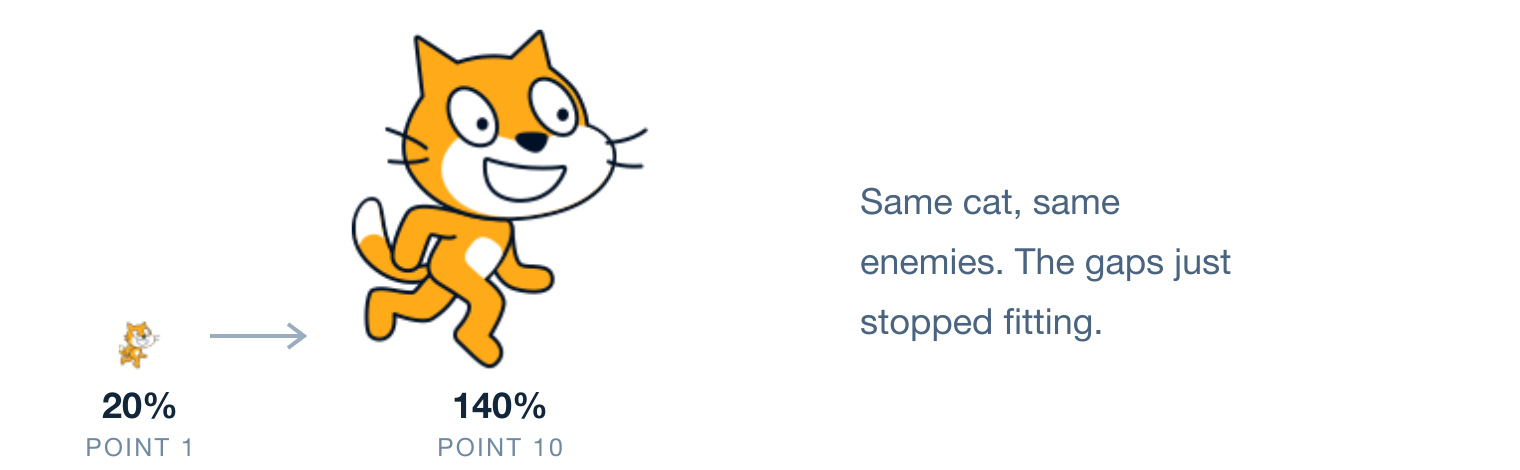
The game gets harder because you are winning, which is the fairest kind of hard.
The Cast
| Sprite | Role | Behaviour | Numbers |
|---|---|---|---|
| Cat | You | Arrow keys, four directions, faces the way it walks. Grows with every point until it is an easy thing to hit. | 20% → 140% · 5 steps/frame |
| Friend | The target | Glides somewhere random, rests, darts again. Blinks out for half a second when caught. | 75% · glide 1s, rest 1s |
| Bouncer ×2 | Indifferent danger | Ricochets off the walls on a fixed heading and never once looks at you. Speeds up as the score climbs. | 70% · Speed 1 → 9 |
| Chaser | Attentive danger | Walks straight at the cat, forever. Always escapable, never ignorable — it is what stops standing still from working. | 70% · 2 steps/frame, fixed |
The Bouncer and the Chaser are the same sprite
Both costumes ship on the Enemy sprite in the starter file, which is why turning a duplicate into a hunter in session 2 costs one click in the Costumes tab rather than a trip to the sprite library.
Why This Game
Scoring and dying are the same block idea — touching? inside a forever loop — so session 2 is a variation on something they already own rather than a new concept from cold.
The two awkward bits pay for themselves. The Friend has to move and watch for the cat at the same time, which forces the most useful idea in Scratch into the open: one sprite can run two scripts at once. And the Chaser makes standing still stop working, which is what turns dodging into a game.
Contents
- Before the First Session
- Session 1 — Drive the Cat, Chase the Friend
- Session 2 — Danger, Lives and Winning
- Script Index
- Common Bugs
- Tuning Numbers
- Upgrade Menu
- Running the Room
Sections 4 to 8 are reference material you dip into rather than read start to finish.
Before the First Session
The Two Project Files
| File | Who gets it |
|---|---|
| Cat-and-Company-STARTER.sb3 | The pupils. Three sprites, sized, positioned, sounds attached — and no code at all. |
| Cat-and-Company-COMPLETE.sb3 | You. Play it in the hook, keep it open in a second window as the answer key. |
The starter buys back the eight minutes that adding sprites would otherwise eat out of a thirty-minute session. Open either with File ▸ Load from your computer.
Setup Checklist
- Both files copied to every machine, or in a shared folder the class can reach
- Scratch opens —
scratch.mit.edu/projects/editor, or the offline Scratch Desktop app. No login is needed for any of this unit - Try File ▸ Load from your computer yourself once. Some browsers put the file chooser somewhere unexpected, and you do not want to find that out with twelve hands up
- Sound is on. The pop and the meow are half the feedback
- Decide and write on the board where pupils save. They must keep session 1’s file to have a session 2
- Play Cat-and-Company-COMPLETE.sb3 yourself for two minutes so the hook is confident rather than exploratory
- Have Common Bugs to hand
What Is Inside the Starter
Three sprites, already sized and positioned, with sounds attached and no blocks whatsoever:
| Sprite | Costume | Note |
|---|---|---|
| Cat | The standard two-costume Scratch Cat | Starts at 20% — deliberately tiny |
| Friend | A cyan blob | Session 1’s target |
| Enemy | Two costumes: a spiky bouncer and a one-eyed stalker | Leave it alone until session 2 |
The Stage has the plain white backdrop and the pop sound.
On the custom art
The Friend and Enemy are simple drawings rather than library sprites, so the file works with no internet and no downloads. Swapping them for Nano, Ghost or Bat is a single click and is on the Upgrade Menu — which makes it a reward rather than a mid-lesson distraction.
If a pupil arrives at session 2 with no file
Hand them Cat-and-Company-COMPLETE.sb3 and let them join in from there. Do not spend session 2 rebuilding session 1. They will still do all of session 2’s building on top of it, which is the part that matters that day.
Session 1 — Drive the Cat, Chase the Friend
By the bell they have a playable, scoring game with something moving in it. Nothing can kill them yet, and that is fine — a game they can show someone is what brings them back next week.
Must finish
The cat drives in four directions and the score goes up. If a pupil is behind, the gliding script is the part to drop — a Friend that stands still plus a working score is a complete session 1, and the wander can be added next week in three minutes. Arrows plus scoring is the non-negotiable line, because session 2 builds directly on both.
0–3 · Play It First
Play Cat-and-Company-COMPLETE.sb3 on the projector for about a minute, badly, so they shout advice at you. Then ask what makes it a game and pull out the three answers you need: something to chase, something to avoid, a number that changes.
Four words on the board
Sprite — a thing on the stage. Stage — where it happens. Script — a stack of blocks. Block — one instruction.
3–6 · Open the Starter
File ▸ Load from your computer ▸ Cat-and-Company-STARTER.sb3
Point at the sprite pane: Cat, Friend, Enemy. Tell them the Enemy is asleep until next week and to leave it alone. Click the Cat — the code area is empty, and it is theirs to fill.
6–15 · Script 1 — Driving the Cat
Build the setup and the first arrow only together on the projector, then test it. Once one arrow works the other three are copies, and they can do those alone.
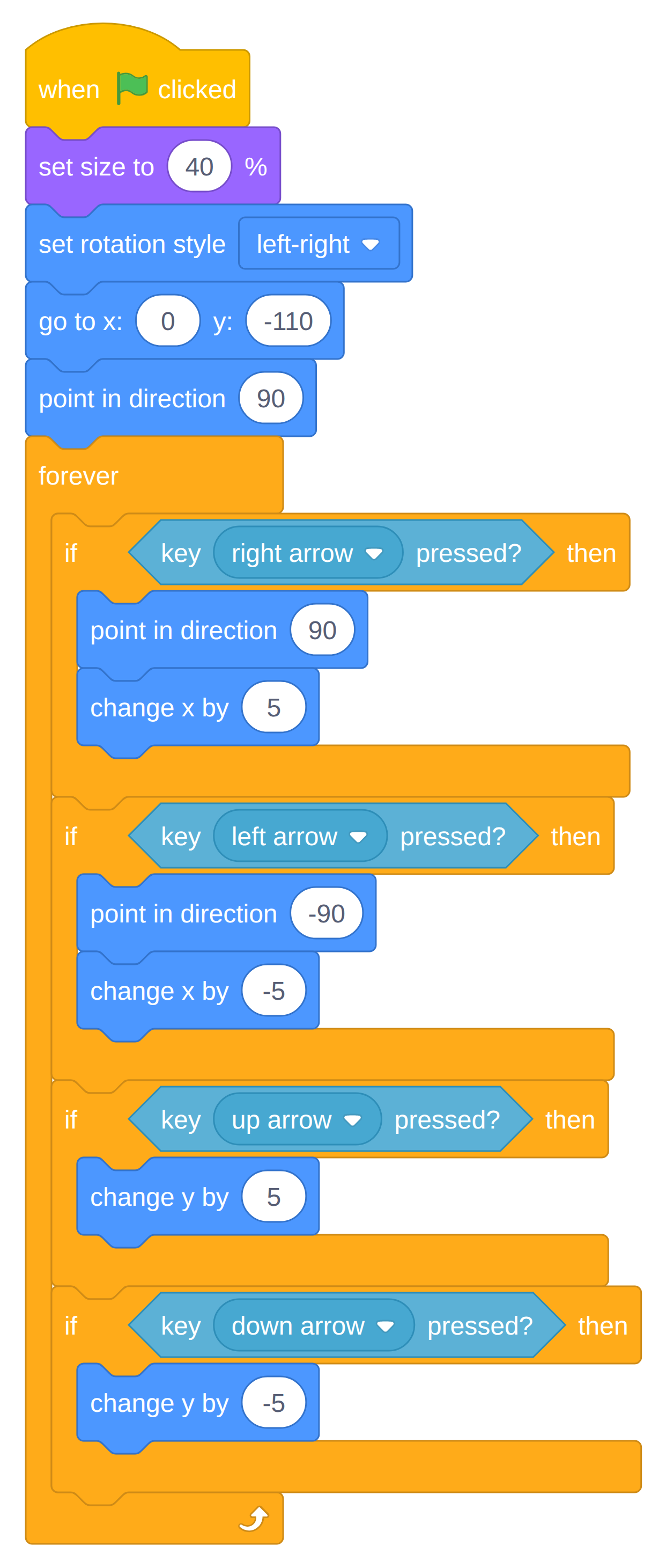
The one idea to labour
Without
forever, the computer checks the arrow key once, in the first thousandth of a second, and then never again. Delete the forever block live and let them watch the cat refuse to move. Put it back.
Up and down have no point in direction on purpose — turning to face up would lay the cat on its side. Say it out loud; someone always asks.
set size to 20 % makes a deliberately tiny cat, and someone will ask why. Tell them it grows later and leave it there — the answer lands much harder in session 2 when they build the growing themselves.
Watch for
- The four
ifs nested inside each other instead of stacked one under the next. The cat then only moves diagonally. Pull them apart on their screen.- Blocks dropped under the
foreverloop. Forever has no bump on the bottom — nothing can ever go after it. A good five-second explanation of why the shape of a block matters.5typed as50. The cat teleports. Funny, then fixed.- Nothing happens at all. Almost always the green flag was never clicked, or the script is on the wrong sprite.
15–20 · Script 2 — The Friend Comes Alive
Click the Friend sprite. No scoring yet — just make it move, because a thing that wanders about the stage on its own gets an audible reaction and buys you the next ten minutes of attention.
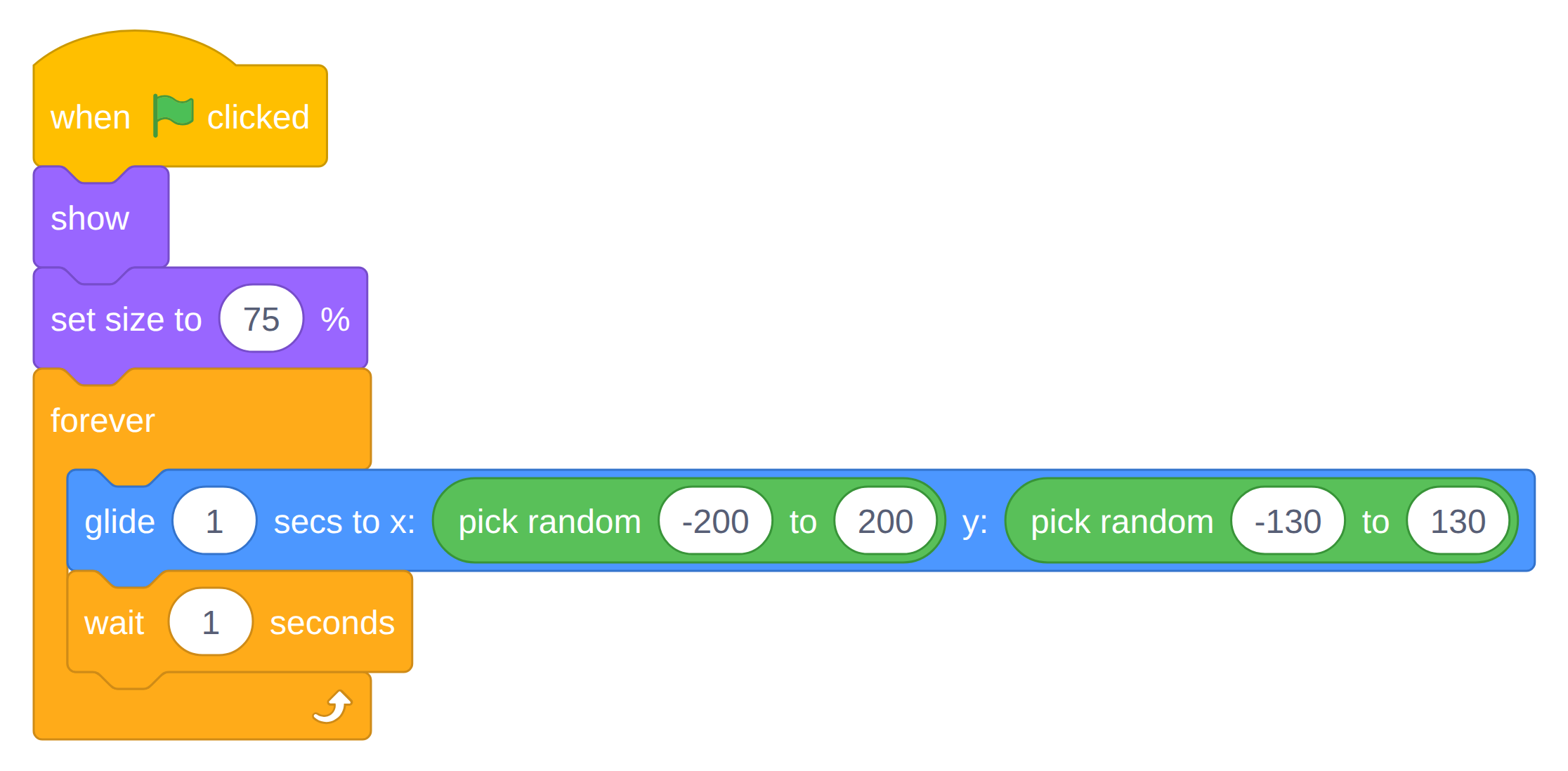
The one new block is glide, and the thing to notice is that it takes time — a whole second passes inside that single block, unlike go to, which happens instantly. Ask them to predict what the sprite will do before clicking the flag.
Say this
The
wait 1 secondsis the difficulty dial. Longer rest, easier game. Anyone who finds the game too hard later should come back and change this number rather than give up — say so now, so they know that tuning is part of the job. See Tuning Numbers.
Watch for
- A Friend that outruns the cat. The glide covers up to the width of the stage in one second. If a pupil can never catch it, change
glide 1 secsto2.go tograbbed instead ofglide. They sit right next to each other in the Motion drawer, and the Friend teleports instead of travelling.
20–27 · Script 3 — Catching It, on a Second Script
First, together: Variables ▸ Make a Variable ▸ “Score” ▸ For all sprites. A variable is a labelled box the whole project can look inside. Drag its readout to a tidy corner of the stage.
Now the important instruction, and it is worth saying twice: leave the gliding script exactly where it is and start a brand-new stack in the empty space beside it. Still on the Friend.
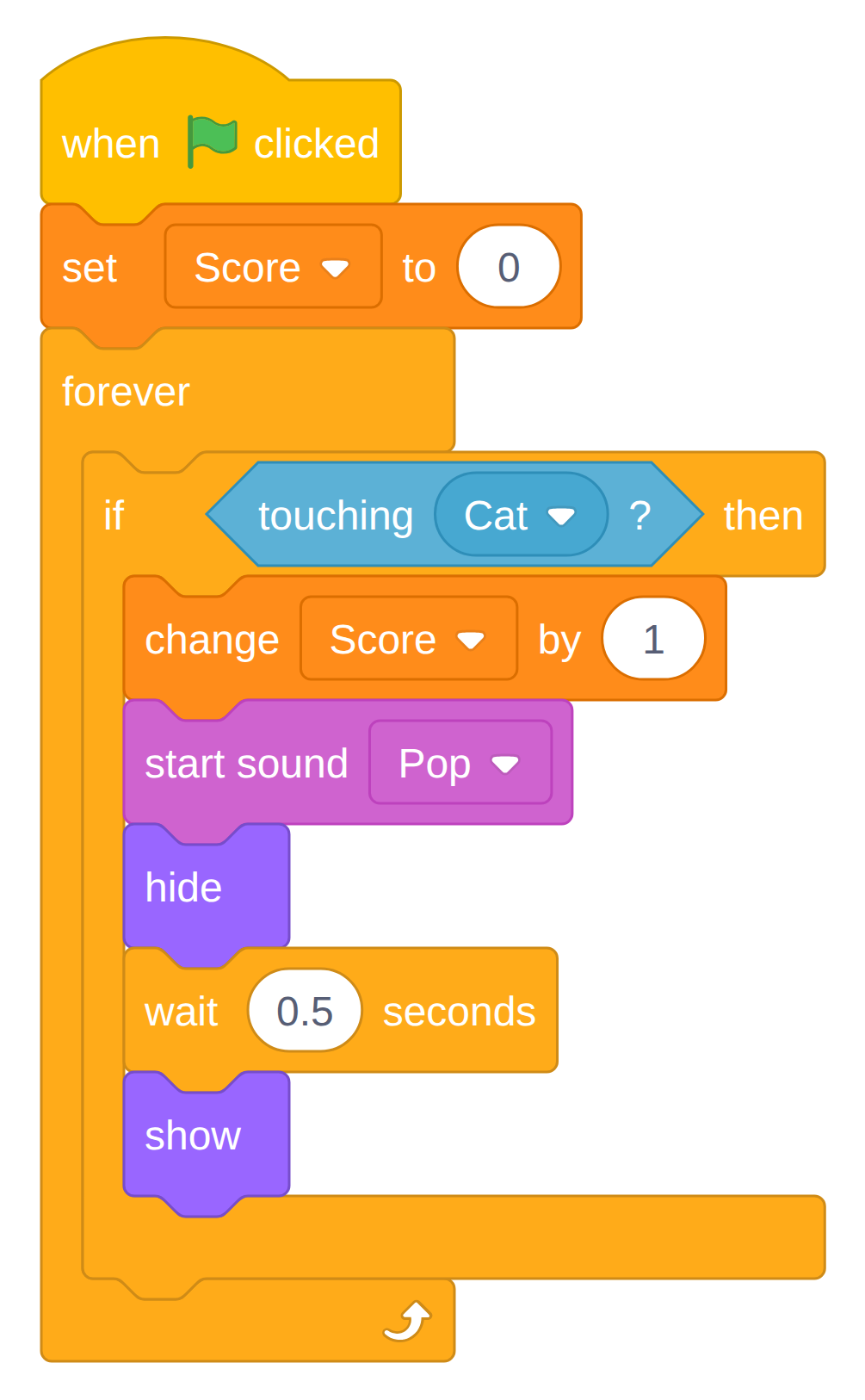
The one idea to labour
Two hat blocks on one sprite means two scripts running at the same time. The Friend is gliding and watching for the cat simultaneously, and neither script knows the other exists. This is the most useful thing they will learn all unit.
If anyone asks why the if cannot just go inside the gliding loop — and someone will — show them. Drop it in there and play: the check now only happens once per second, between glides, so the cat sails straight through the Friend and scores nothing. Thirty seconds, and the idea lands permanently.
Why hide and show: a hidden sprite is not touching anything, so one catch counts once instead of thirty times. And because the other script never stopped gliding, the Friend reappears somewhere new all by itself.
Watch for
- The second script attached to the bottom of the first. It cannot be —
foreverhas no bump underneath — so it ends up floating loose with no hat. A stack with no hat block never runs, which looks exactly like “my code doesn’t work”.set Score to 0dragged inside the forever loop. The score is reset thirty times a second and never leaves zero.- The
hide/showpair split up. A Friend that hides and never comes back is missing itsshow, or theshowended up outside theif.touchingstill set tomouse-pointer. It is the default in that dropdown.- Variable made “For this sprite only.” It will not be visible to the Cat next session. Catch it now — delete and remake it.
27–30 · Play, Then Save Properly
Everyone stands up and plays the game to their left for sixty seconds.
Then, all together and out loud: File ▸ Save to your computer, named firstname-catgame.sb3, into the agreed folder. Do not let anyone leave without this — it is next week’s starting point.
Exit ticket
One sentence on a sticky note: why does the Friend need two separate scripts?
Reading those twelve answers tells you exactly how to open session 2.
Session 2 — Danger, Lives and Winning
Four new ideas, in the order they get used: sprite duplication, the one block that makes a sprite look like it is thinking, broadcasts, and a condition that ends the game. Every one of them hangs off the forever ▸ if touching pattern they already wrote last week.
Must finish
One enemy that can take a life. If the room is slow, the Chaser is the part worth protecting and the second bouncer is the part to drop — a hunter plus a scoring loop is a better game than three bouncers. The escalation beat is the designed overflow: the best ending if you get there, and the easiest thing to carry home if you don’t.
0–3 · Reload and Prove It Works
Load last week’s file, click the green flag, score one point. Anyone whose file is missing gets Cat-and-Company-COMPLETE.sb3 and joins in from there.
Recap in one question
Which block was checking the arrow keys over and over?
3–8 · The Bouncer Patrols
Click the Enemy sprite. This script has no if in it at all yet — get it bouncing first, because a moving enemy is instantly satisfying and it isolates the new motion blocks.
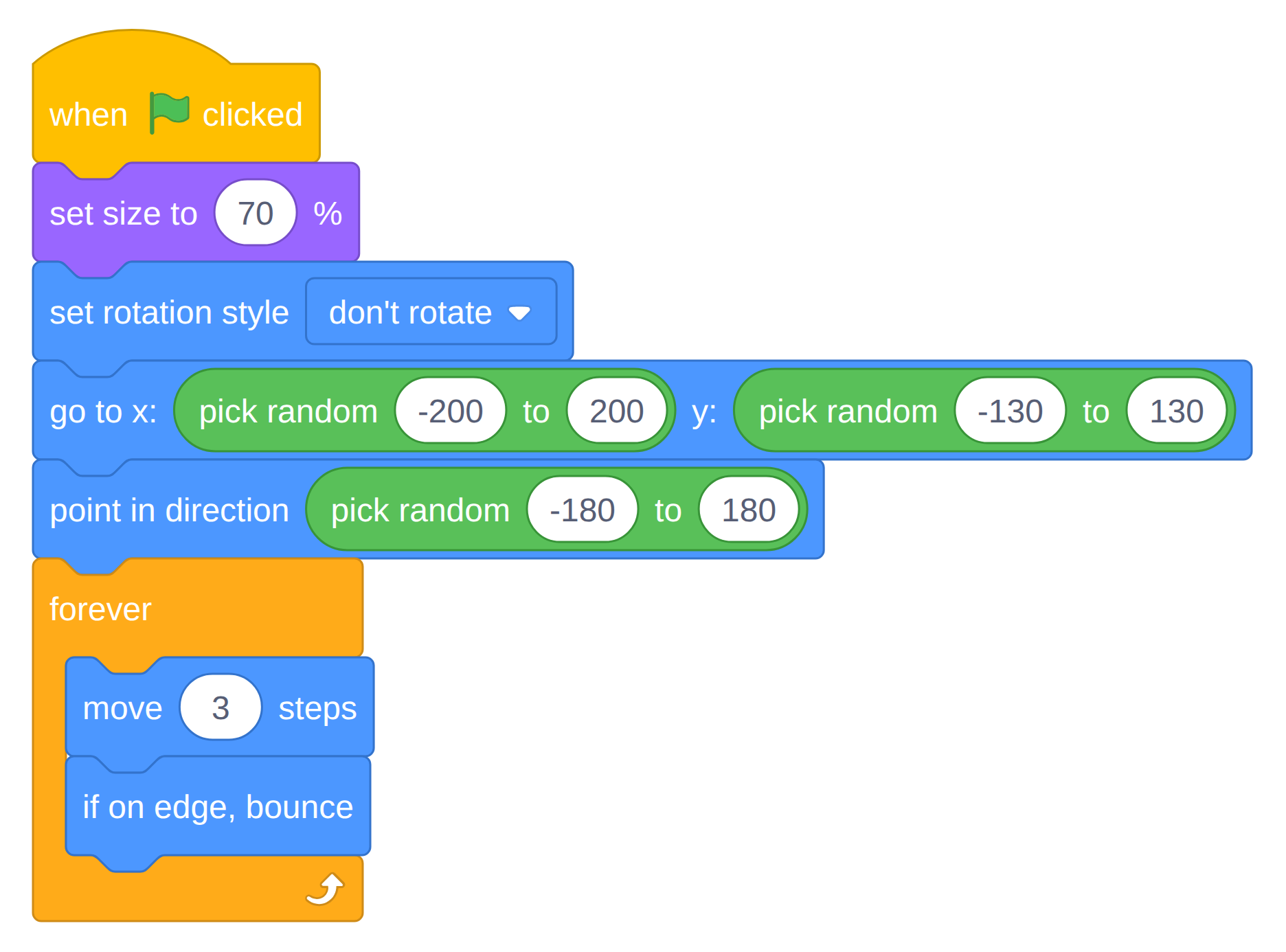
Test it: one enemy ricocheting around the stage, ignoring everything. That indifference is the point — remember it in six minutes’ time.
8–14 · Two Copies — And One That Hunts You
Right-click the Enemy ▸ duplicate, twice. Duplicating a sprite brings all of its blocks with it; say that out loud, because it is the first moment in this unit where earlier care pays a dividend.
Enemy2 needs no changes at all — it starts in a different random spot heading a different random way, and that is enough. Thirty seconds of work for a whole second enemy.
The third copy becomes something else entirely. Rename it Chaser in the name box above the sprite list, open its Costumes tab and click the second costume so it stops looking like a bouncer. Then three changes to its script:
- Drag
point in direction (pick random −180 to 180)out of the setup and drop it over the block palette to bin it. The Chaser does not need a starting direction. - Drag
if on edge, bounceout of the loop and bin that too. It never bounces — it has somewhere to be. - Put
point towards (Cat)at the top of the forever loop, and changemove 3 stepsto2.
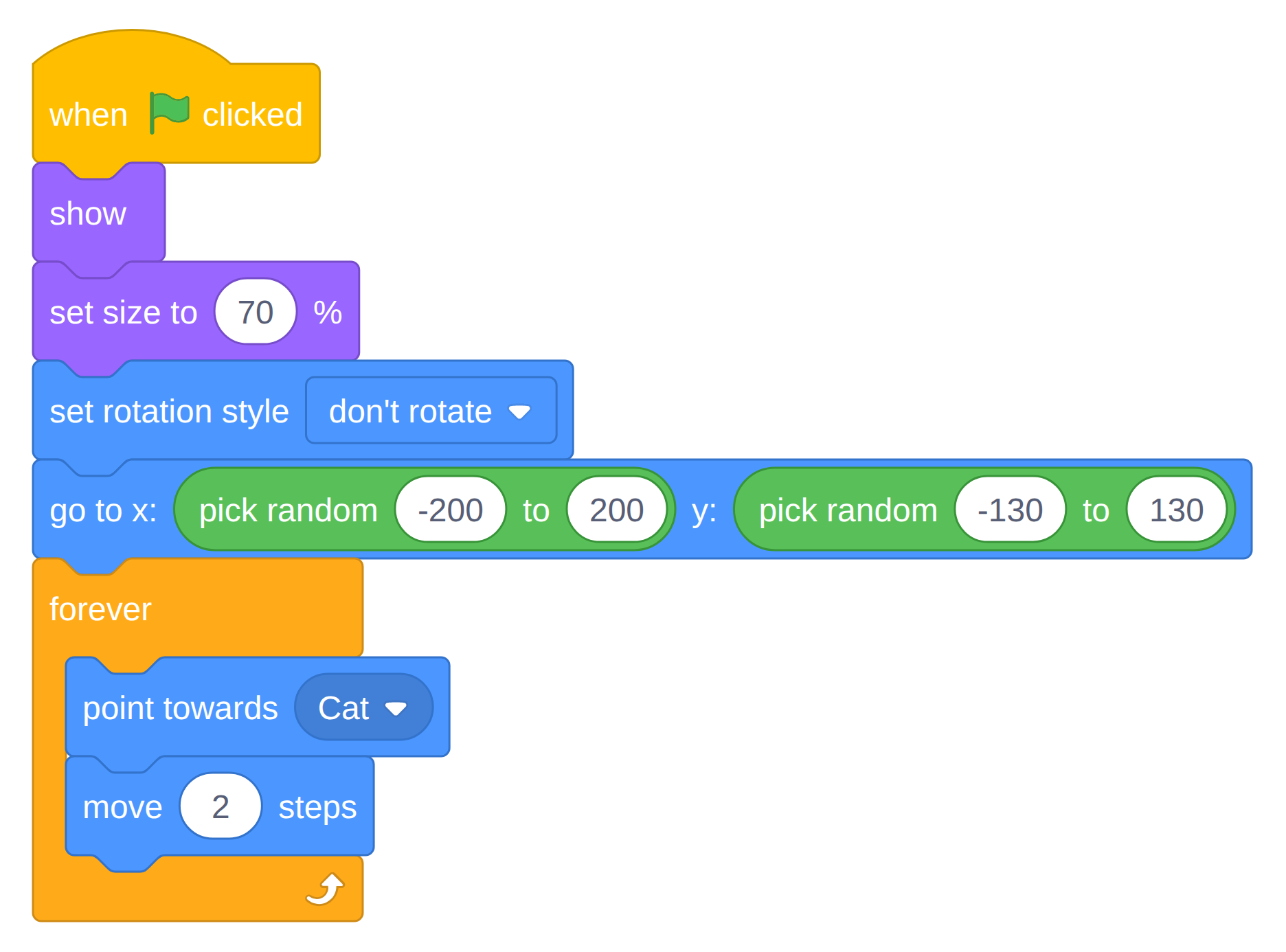
The one idea to labour
point towardsis the entire illusion. One block, and a lump of pixels reads as something that wants you. Ask them what the Chaser knows — the honest answer is nothing at all. Thirty times a second it asks which way the cat is and takes one small step. That is what every enemy in every game they have ever played is doing.
Why it must be slower than the cat
Something you cannot outrun is not a challenge, it is a countdown.
move 2against the cat’s5means the Chaser can always be escaped and never be ignored. Have that sentence ready, because someone will set it to 10 and die in a second and a half.
Watch for
point towardsleft onmouse-pointer. That is the default, and the result is oddly compelling — the Chaser follows the mouse instead. Worth thirty seconds of play before they fix it.- A Chaser that veers away near the walls.
if on edge, bounceis still in the loop, fightingpoint towardsfor control of the direction.- A spinning Chaser.
set rotation style: don't rotatecame free with the duplicate, so if it is cartwheeling that block was binned by mistake.move 3 stepsnever changed. Nearly cat speed. Unplayable, and they will blame the game rather than the number.
14–20 · Getting Hit — Broadcast and Lives
Make a second variable, Lives, For all sprites. Then add one if to all three enemies, at the bottom of each forever loop. Build it on Enemy, then drag the whole if block onto the Enemy2 and Chaser thumbnails to copy it across — the same script works unchanged in all three, which is worth pointing out.
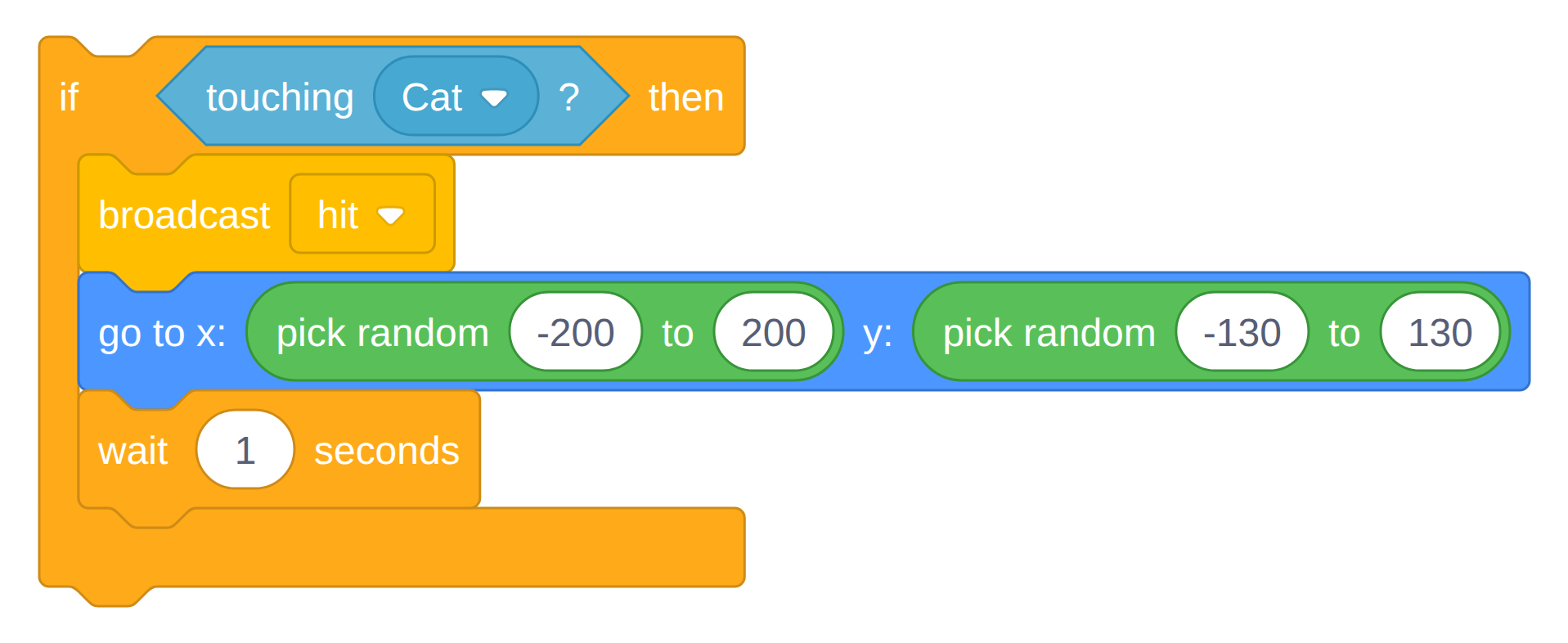
Make the message once, in the dropdown: New message ▸ hit. After that it is in every sprite’s list.
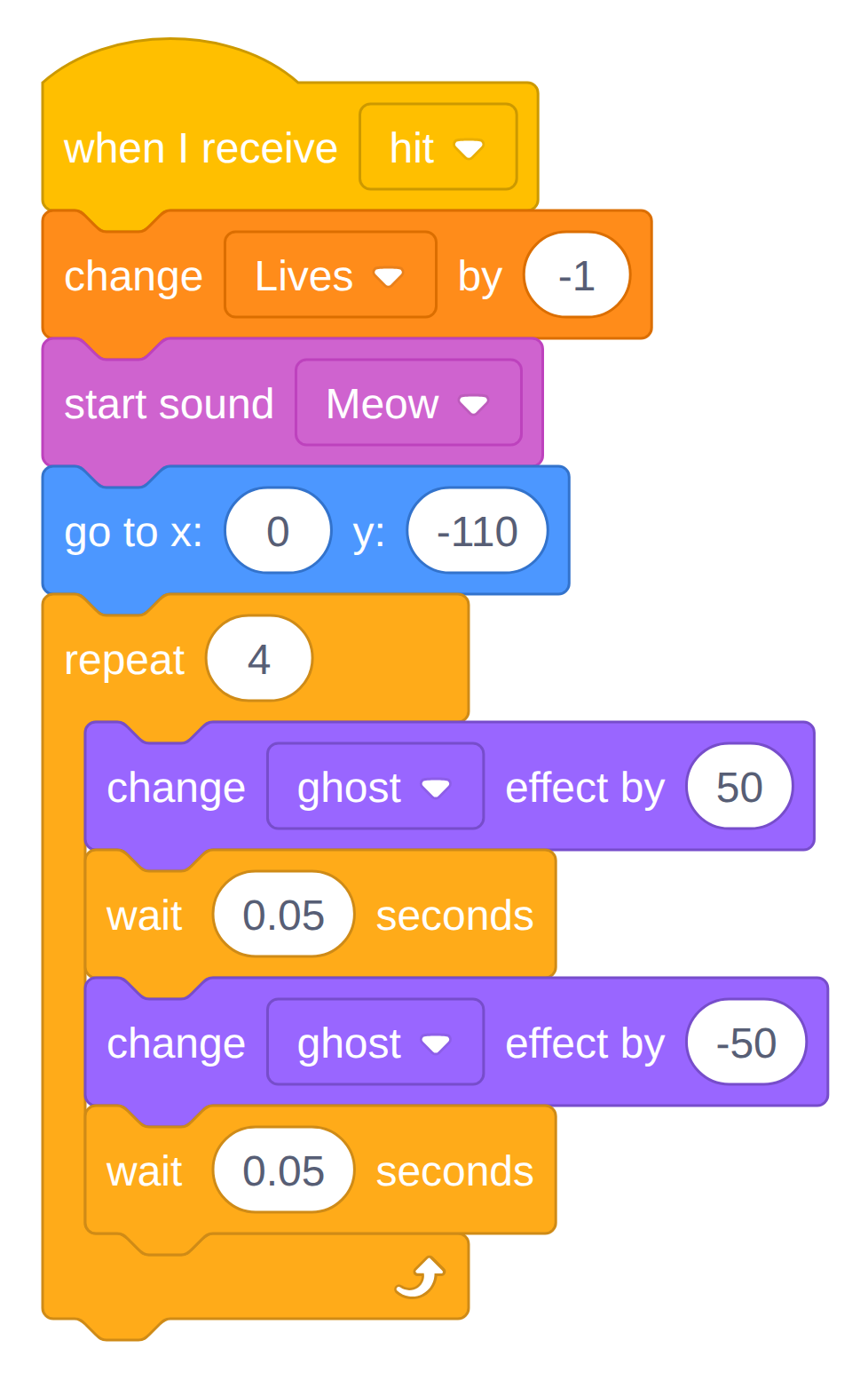
Now back to the Cat. Add set Lives to 3 into the green-flag script from last week, just above the forever loop, and add this brand-new script beside it:
The one idea to labour
A broadcast is a shout across the whole project. Three enemies — two bouncers and a hunter, with nothing else in common — shout the same word, and one script on the cat listens. Ask what they would have had to do without it: three copies of the same reaction, and three places to fix every future change.
Watch for
- The
wait 1 secondsleft out. One touch lasts many frames, so all three lives disappear instantly. This bug is the reason the wait is there — show them the before and after.change Lives by 1instead of-1. Immortality. Then ask how they would have noticed if the number were not on screen.- A ghostly cat that stays half-invisible. The two ghost changes must cancel out; add
set ghost effect to 0at the top of the green-flag script as insurance.when I receiveput on the Enemy. The cat is the one that reacts.
20–24 · Winning and Losing
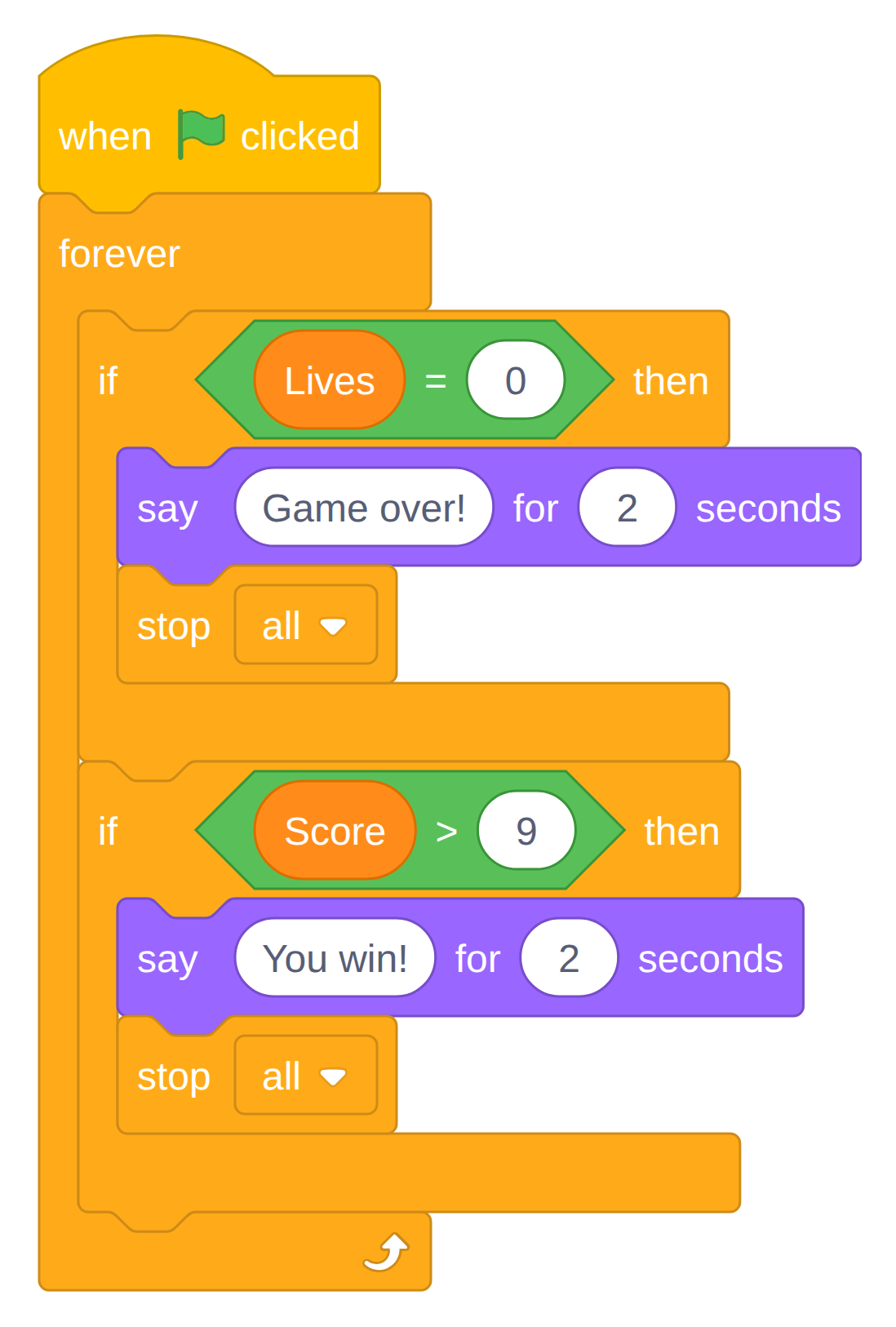
A third script on the Cat — the referee. It watches the two numbers and nothing else.
Worth a real minute
Why
> 9rather than= 10? Because if the score ever jumps from 9 to 11, an equals check misses it forever and the game can never be won. Asking “what if it skips?” is the first genuinely professional habit in this unit.
24–30 · It Gets Harder Every Time You Score
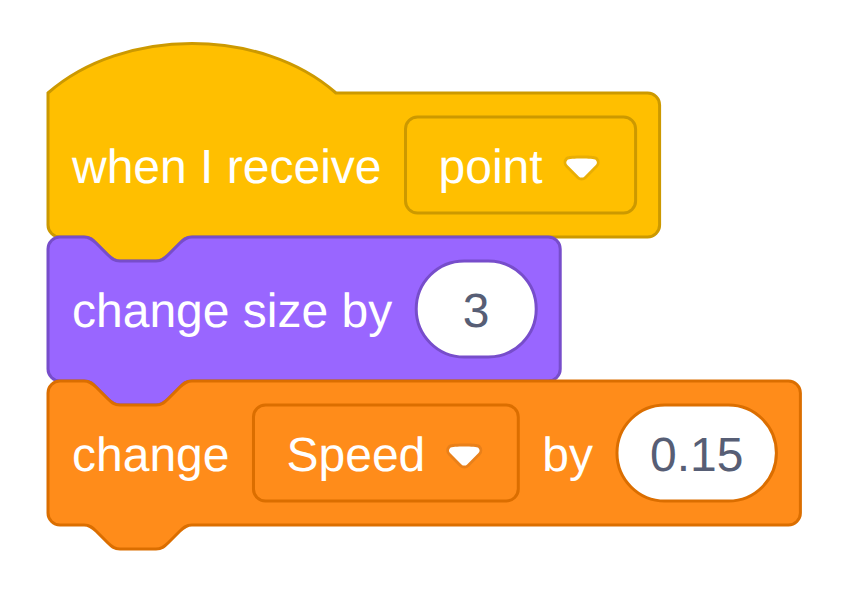
Right now point nine is exactly as hard as point one. Two changes fix that, and both hang off a second broadcast — the concept from ten minutes ago, used again for something completely different.
Make a third variable, Speed, For all sprites. Untick its box so it stays off the stage, or leave it ticked for the first run so they can watch the number climb.
On the Friend, one block into the scoring script, under change Score by 1:

On the Cat, set Speed to 1 joins the green-flag setup, plus a fourth script:
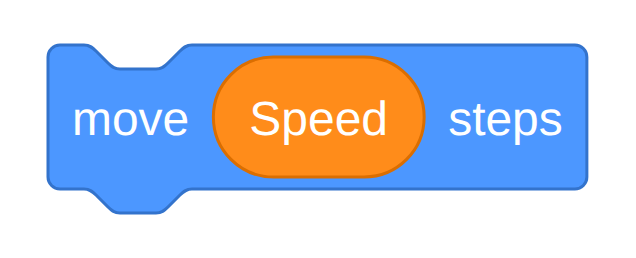
On both bouncers, drag the round Speed block out of the Variables palette and drop it into the white oval of move ( ) steps, replacing the 3:
Leave the Chaser on 2 — a hunter that accelerates stops being fair.
The one idea to labour
Dropping a variable into a slot is new. Until now variables were things you set, changed and watched. This is the first time one is used as an input, and it is the moment a variable stops being a scoreboard and becomes a dial the game turns on itself.
Ask this and wait
Why is a bigger cat harder to play? Wait for someone to get there: the cat takes up more room, so gaps that used to fit no longer do. Nothing about the enemies changed. The game got harder because they were winning — which is the fairest kind of hard, and worth naming.
Then save, and everyone leaves having picked one card off the Upgrade Menu to finish at home. In thirty minutes there is no room to build an upgrade in class, so make choosing it the last thing that happens rather than pretending otherwise.
Watch for
change Speed by 0.8typed as8. One point and the bouncers become a blur. Genuinely funny, and a free lesson in decimal places.- Bouncers frozen on the spot.
set Speed to 1is missing from the cat’s green-flag script, so Speed is still 0.- The Speed block dropped on the move block rather than into its oval. It lands beside the script as a loose reporter and nothing changes.
broadcast pointput on the Cat instead of the Friend. The cat would have to shout at itself; nothing ever grows.
Script Index
Every block image lives in Attachments, so you can drop any of them straight into a slide or a worksheet. Cat-and-Company-COMPLETE.sb3 is the working answer key.
| Image | Sprite | Built in |
|---|---|---|
| Cat driving | Cat | S1 · 6–15 |
| Friend wander | Friend | S1 · 15–20 |
| Friend scoring | Friend | S1 · 20–27 |
| Bouncer patrol | Enemy, Enemy2 | S2 · 3–8 |
| Chaser hunt | Chaser | S2 · 8–14 |
| Enemy taking a life | all three enemies | S2 · 14–20 |
| Cat when I receive hit | Cat | S2 · 14–20 |
| Cat referee | Cat | S2 · 20–24 |
| Friend broadcast point | Friend | S2 · 24–30 |
| Cat grow and speed up | Cat | S2 · 24–30 |
| Bouncer move Speed steps | Enemy, Enemy2 | S2 · 24–30 |
| Cat walking animation | Cat | bonus, see Upgrade Menu |
The Cat also carries two housekeeping blocks the lessons never dwell on: point in direction 90 and set ghost effect to 0 at the top of the green-flag script, insurance against a cat left facing backwards or half-transparent by an interrupted flash.
Common Bugs
Organised by symptom, because that is what you have when a hand goes up. Walk to the machine, read the symptom, and you will almost always be right first time.
The Cat
Nothing happens at all — the green flag was never clicked, or the script is on the wrong sprite. Check the sprite pane before you check the blocks; this is the single most common cause of “it’s broken” in the whole unit.
The cat only moves diagonally — the four if blocks are nested inside each other instead of stacked. Hard to see, hard to fix by description; pull them apart on their screen.
The cat moves once and stops — the if blocks are outside the forever loop, or the forever is missing.
The cat teleports across the stage — change x by 5 was typed as 50.
The cat lies on its side or spins — set rotation style left-right is missing from the setup.
The cat stays half-transparent — the two change ghost effect by blocks are not cancelling out. Add set ghost effect to 0 to the green-flag script as permanent insurance.
The cat is immortal — change Lives by 1 instead of -1.
The cat never grows — broadcast point ended up on the Cat instead of the Friend, so the cat would have to shout at itself.
The Friend
The Friend teleports instead of travelling — go to was grabbed instead of glide.
The Friend can never be caught — the glide crosses the stage in one second. Change it to 2 secs, or lengthen the rest. See Tuning Numbers.
The score rockets to 400 in a second — the hide / wait / show group is missing or broken, so one touch counts on every frame. A hidden sprite is not touching anything — that is the whole trick.
The Friend hides and never comes back — the show is missing, or it ended up outside the if.
The score stays at zero — set Score to 0 was dragged inside the forever loop.
Scoring works only occasionally — the if touching was put inside the gliding loop. Because glide holds that loop for a whole second, the check happens once per second and the cat sails right through. It needs its own hat block.
A stack of blocks that clearly never runs — it has no hat block. Probably dragged towards the bottom of the gliding script, where forever has no bump to attach to.
The Cat cannot see the Score next session — the variable was made “For this sprite only”. Delete it and remake it as For all sprites.
The Enemies
touching never triggers — the dropdown is still on mouse-pointer.
All three lives vanish instantly — the wait 1 seconds is missing from the enemy’s hit branch. Show them the before and after; this bug is the explanation.
The Chaser follows the mouse pointer — point towards is still on its default. Let them play with it for thirty seconds first.
The Chaser veers away near the walls — if on edge, bounce is still in the loop, fighting point towards for the direction.
The Chaser cartwheels — set rotation style don't rotate was binned during the three edits.
The Chaser is impossible to escape — move 3 steps was never changed to 2, or someone raised it.
The bouncers sit completely still — set Speed to 1 is missing from the Cat’s green-flag script, so Speed is still 0.
The bouncers become a blur after one point — change Speed by 0.8 was typed as 8.
Dragging the Speed variable did nothing — it was dropped on the move block rather than into its white oval, so it landed beside the script as a loose reporter.
Whole-Project
Two sprites both reset the score — only the Friend should hold set Score to 0.
It freezes on a say block — check that stop all follows it.
Everything is slow and stuttery — usually a wait block that ended up in the driving loop. The cat’s forever loop must never wait.
The debugging question to teach
Before touching anything, ask: “which sprite is this script on, and what should have happened first?” Most bugs in this unit are a right script on a wrong sprite, or a block one slot from where it belongs.
Tuning Numbers
Every number was chosen, not guessed. “Change the number and play it again” is the single most valuable habit a pupil can take away from this unit — when someone complains the game is unfair, the right answer is never “that’s just how it is”, it is “which number would you change?”
| Dial | Where it lives | Default | Easier | Harder |
|---|---|---|---|---|
| Cat speed | Cat · change x/y by | 5 | 7 | 4 |
| Cat start size | Cat · set size to | 20 % | 15 % | 30 % |
| Growth per point | Cat · change size by | 12 | 7 | 16 |
| Lives | Cat · set Lives to | 3 | 5 | 1 |
| Target score | Cat · referee, Score > _ | 9 | 4 | 19 |
| Friend travel time | Friend · glide _ secs | 1 | 2 | 0.6 |
| Friend rest | Friend · wait _ seconds | 1 | 2 | 0.3 |
| Hidden after a catch | Friend · wait _ seconds | 0.5 | 1 | 0.2 |
| Bouncer start speed | Cat · set Speed to | 1 | 0.5 | 2 |
| Speed gained per point | Cat · change Speed by | 0.8 | 0.4 | 1.2 |
| Chaser speed | Chaser · move _ steps | 2 | 1 | 3 |
| Grace period after a hit | Enemies · wait _ seconds | 1 | 2 | 0.5 |
Cat 5, Chaser 2. The Chaser moves at 40% of the cat. Something you cannot outrun is a countdown; something you can ignore is not a threat. Forty percent is both escapable and unforgettable. Anything at or above 5 breaks the game.
Cat 20% growing to 140%. A difficulty curve you can see — the cat finishes seven times as wide as it started, better than a quarter of the stage across. The hitbox grows with the sprite, so gaps that used to fit stop fitting. Ten points × 12 = +120. If you shorten the game, raise the growth to keep the same swell — at a 5-point target, change size by 24.
Bouncers 1 rising by 0.8. Nine times faster by the end: a crawl at the first point, a 9 at the tenth that is nearly double the cat’s 5. They still travel in straight lines and never aim at you, which is what keeps a bouncer quicker than the cat survivable — the Chaser could never get away with this. The early game is deliberately quiet, so the ramp is the thing they feel. If the endgame is brutal, cut the gain to 0.4 before you cut the starting speed; the escalation is the interesting part.
Friend: glide 1 second, rest 1 second. A full-stage glide is faster than the cat, so the Friend can genuinely get away — and then it sits still for a whole second, which is when you take it. That rhythm is the game. This pair is the main difficulty dial, and you should push the rest up before you slow the glide down: a slow Friend is boring, a resting Friend is catchable.
Grace period 1 second. Without it, one collision lasts many frames and drains all three lives instantly. This is deliberately left as a bug for pupils to discover.
Gentle — for a class finding it frustrating
Lives
5· targetScore > 4· growth24· Friend rest2· Chaser1· Speed gain0.4
Nasty — for the pupil who finished ten minutes early
Lives
1· targetScore > 19· Friend rest0.3· Chaser3· Speed gain1.2
Then ask them to actually beat it. They will be back to retune it within a minute, which is the point.
The one change never to allow
The Chaser reading
Speed. It looks tidier for every enemy to share the variable, but a hunter that accelerates as you win turns the endgame into a countdown. Keep it a literal2. A good conversation about the difference between consistent and good.
Upgrade Menu
Pick one. One, so that it gets finished. Roughly ordered by how much new thinking each needs.
New cast (easiest) — click the Friend’s costume, then Choose a Costume from the library: Nano, Puppy, Star. Same for the enemies: Ghost, Bat, Beetle. Add a backdrop while you are there. Nothing in the code changes, which is a point worth making: what a sprite looks like and what it does are two separate things.
Sound design (easiest) — a different pickup sound on the Friend and a different hurt sound on the Cat. Then try play sound until done instead of start sound and work out which one freezes the game, and why.
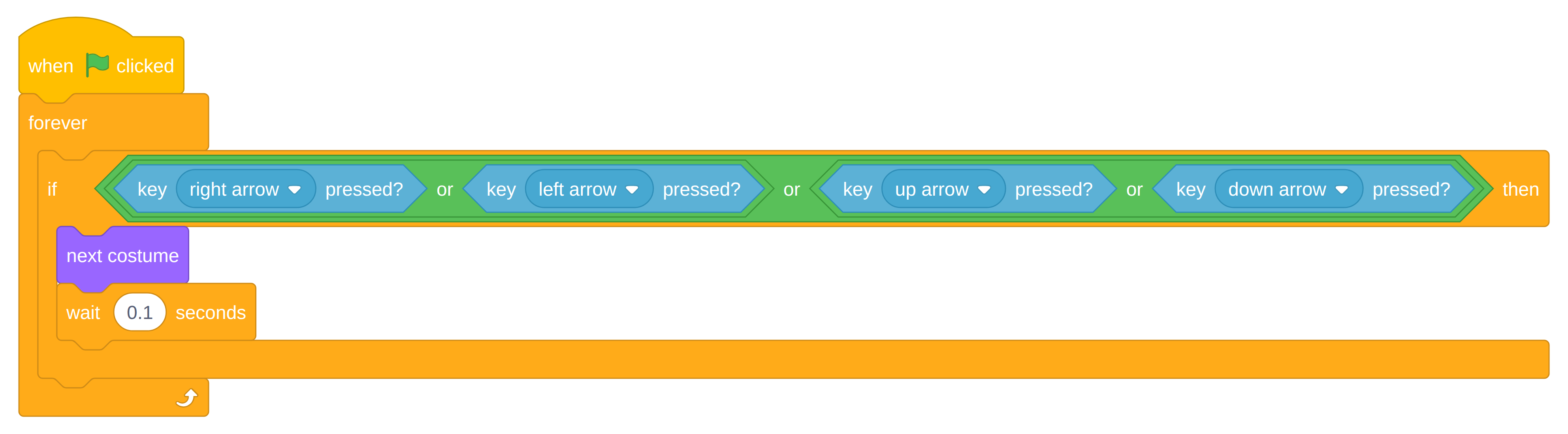
Walking cat (a bit more) — a fifth script on the Cat so it animates only while a key is held. Building the or condition out of four key pressed? blocks is a proper puzzle; the nesting is the hard part. Already in Cat-and-Company-COMPLETE.sb3 if they get stuck.
Countdown timer (a bit more) — a Time variable set to 30 and a loop of wait 1 seconds ▸ change Time by -1. At zero, say the score and stop all. Turns the game from endless into a race.
Skittish Friend (a bit more) — swap the Friend’s wait 1 seconds for wait (pick random 0.2 to 1.5) seconds so its rhythm stops being predictable. The greedy version, in the same loop: if (distance to Cat) < 80 then point towards Cat ▸ turn 180 degrees ▸ move 40 steps — now it genuinely flees.
Remember the best score (hardest) — a Best variable that survives between games, so do not reset it at the green flag. In the referee, before stop all: if (Score) > (Best) then set Best to (Score). Comparing a variable against another variable is the step up, and it is how every arcade machine keeps its high score.
A second level (hardest) — at 10 points switch backdrop, reset the score, and reveal a fourth enemy that started hidden. Needs a broadcast called level 2, which is the session 2 concept used for something they invented themselves.
For the pupil who has done them all
Ask them to make the game harder without adding a sprite and without adding a block — only by changing numbers. Straight back into Tuning Numbers, and a better exercise than it sounds.
Running the Room
If They Are Ahead
Send them to the Upgrade Menu — never to “help others” by grabbing the mouse. If you want a helper, make the rule explicit: helpers may point and talk, but may not touch the keyboard. A pupil who has had their code typed for them has learned nothing except that they are slow.
If They Are Behind
Two directions instead of four is a complete game. So is one enemy. The Must finish box in each session is the real target; everything above it is optional. Pairing works well — one drives the mouse for five minutes, then they swap, on your call, not theirs. Left to themselves, the confident one keeps the mouse all lesson.
What to Assess
Not whether it works — whether they can say why. Four questions that separate copying from understanding:
- Why does the
ifneed to be inside theforever? - Why does the Friend need two scripts instead of one?
- Why is
setoutside the loop andchangeinside it? - Why does one broadcast beat three copies of the same script?
A pupil who can answer three of those has understood the unit, whatever their game looks like. A pupil with a perfect game who can answer none has copied it off the board.
The Block Colours
The colour of a block tells you which drawer to find it in. Point at the palette rather than reading out block names — it is faster, and it builds the mental map you want them to have by session 2.
| Colour | Drawer | Used here for |
|---|---|---|
| Blue | Motion | change x by, glide, move, point towards, if on edge, bounce |
| Purple | Looks | set size to, change size by, hide, show, say, change ghost effect |
| Pink | Sound | start sound |
| Yellow | Events | when green flag clicked, broadcast, when I receive |
| Orange | Control | forever, if, repeat, wait, stop |
| Light blue | Sensing | key pressed?, touching?, distance to |
| Green | Operators | pick random, =, >, or |
| Dark orange | Variables | set, change, and the round reporter blocks |
Small Rules That Save Time
- Green flag, every time. Half of “it’s broken” is a script that was never started.
- Check the sprite before the blocks. The other half is a right script on the wrong sprite.
- Never delete to fix — drag it out first. Blocks pulled to one side can be dragged back; blocks dropped on the palette are gone.
- Save before you experiment, especially before anyone tries the Nasty preset.
Timing Reality
Thirty minutes is thirty minutes. Both sessions are built so the last beat is the droppable one, and both name what to cut before you get there. If you are five minutes behind at the halfway mark, cut early and deliberately rather than rushing the end — a class that finishes something small works better than one that half-finishes something big.